---
title: CDU (Pleur-evac) Modification Instructions for Use with the Avthor
description: Tools, materials, and easy steps to get your CDU (Pleur-evac) ready for repeated use.
---
[Skip to content](https://help.avkin.com/cdu-modification-instructions-for-use-with-avthor#main-content)
[](https://help.avkin.com/?hsLang=en)
Open main navigation
Close main navigation
- [Go to avkin.com](https://avkin.com/)
[Go to avkin.com](https://avkin.com/)
Hello. How can we help you?
- There are no suggestions because the search field is empty.
1. [Knowledge Base](https://help.avkin.com/?hsLang=en)
2. [Avthor](https://help.avkin.com/avthor?hsLang=en)
# CDU (Pleur-evac) Modification Instructions for Use with the Avthor
## Tools, materials, and easy steps to get your CDU (Pleur-evac) ready for repeated use.
Modifying your CDU allows it to be drained, cleaned, and reused safely with the Avthor.
**Items Needed:**
• Recommended: Safety glasses
• Drill
• 3/8” Countersink drill bit
• Optional: Hemostats, water-soluble lubricant
• Black Neoprene Plugs (Suggested product can be found **[HERE](https://www.caplugs.com/p/black-neoprene-plugs-bn-sh?itemNumber=BN000\))**)
**Steps:**
**1.** Identify each of the chambers on your CDU (Pleur-evac).
*Note: Devices shipped from Avkin most often have 5 chambers.*
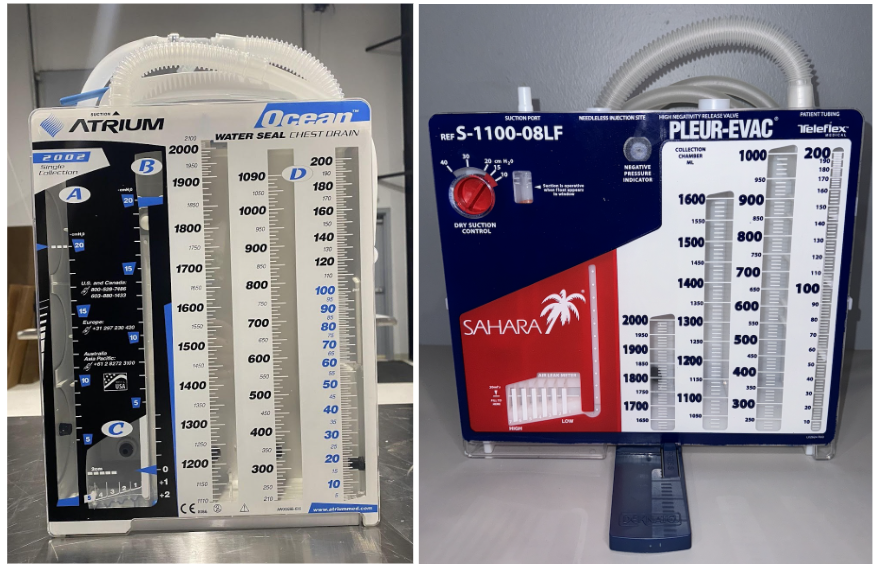
**2.** Choose a location in each chamber where you can drill a ⅜” hole without damaging another area or chamber.
**3.** Once identified, mark each location with a permanent marker.
**4.** Using the drill, slowly create a starter hole. Because the plastic may be brittle, gradually widen the hole until it reaches ⅜”.
**5.** Remove any plastic shavings from the hole.
*Tip: Hemostats may help with this step.*
**6.** Insert the smaller end of the neoprene plug into the hole to ensure proper fit.
*Tip: If the plug does not insert smoothly, apply a small amount of water-soluble lubricant.*
**7.** Once all holes are plugged, perform a pressure test to verify that the device holds a seal with no air leaks.
**8.** All Done!
- [Avkin](https://help.avkin.com/avkin?hsLang=en#main-content)
- [Avkin Consumables and Replacement Parts](https://help.avkin.com/avkin?hsLang=en#avkin-consumables-and-replacement-parts)
- [General Troubleshooting](https://help.avkin.com/avkin?hsLang=en#general-troubleshooting)
- [General Device Questions](https://help.avkin.com/avkin?hsLang=en#general-device-questions)
- [Avkin's Educational Programs](https://help.avkin.com/avkin?hsLang=en#avkins-educational-programs)
- [Avkin's Wearable Packages](https://help.avkin.com/avkin?hsLang=en#avkins-wearable-packages)
- [Shipping Devices for Maintenance](https://help.avkin.com/avkin?hsLang=en#shipping-devices-for-maintenance)
- [Avkin App](https://help.avkin.com/avkin-app?hsLang=en)
- [Avband](https://help.avkin.com/avband?hsLang=en)
- [Avbirth](https://help.avkin.com/avbirth?hsLang=en#main-content)
- [iSimulate CTGi Fetal Heart Monitor (FHM)](https://help.avkin.com/avbirth?hsLang=en#isimulate-ctgi-fetal-heart-monitor-fhm)
- [Avcath](https://help.avkin.com/avcath?hsLang=en)
- [Avstick](https://help.avkin.com/avstick?hsLang=en)
- [Avtone](https://help.avkin.com/avtone?hsLang=en)
- [Avthor](https://help.avkin.com/avthor?hsLang=en)
- [Avline](https://help.avkin.com/avline?hsLang=en)
- [Avtrach](https://help.avkin.com/avtrach?hsLang=en#main-content)
- [Avtrach with Ventilator (Simulated Lungs)](https://help.avkin.com/avtrach?hsLang=en#avtrach-with-ventilator-simulated-lungs)
- [Avtrach Video Series](https://help.avkin.com/avtrach?hsLang=en#avtrach-video-series)
- [Avwound](https://help.avkin.com/avwound?hsLang=en)
- [Tablets](https://help.avkin.com/tablets?hsLang=en)
- [Third-Party Devices](https://help.avkin.com/third-party-devices?hsLang=en#main-content)
- [iSimulate CTGi Fetal Heart Monitor (FHM)](https://help.avkin.com/third-party-devices?hsLang=en#isimulate-ctgi-fetal-heart-monitor-fhm)
- [Innov2learn Pulse Oximeter](https://help.avkin.com/third-party-devices?hsLang=en#innov2learn-pulse-oximeter)
- [Innov2learn Thermometer](https://help.avkin.com/third-party-devices?hsLang=en#innov2learn-thermometer)
- [KBPort BPSim](https://help.avkin.com/third-party-devices?hsLang=en#kbport-bpsim)
- [Standardized Patients (SP)](https://help.avkin.com/standardized-patients-sp?hsLang=en)
- [Service Agreements](https://help.avkin.com/service-agreements?hsLang=en)
[](https://avkin.com/)
avkin.com
Help Center
Copyright © 2025, Avkin