---
title: How to Ship Your Avkin Wearable Device Back for Repairs or Maintenance
description: Learn how to safely return your Avkin device for repairs or maintenance, including tips for using the protective case, packing, and including accessories if needed.
---
[Skip to content](https://help.avkin.com/how-to-ship-your-avkin-device-back-for-repairs-or-maintenance#main-content)
[](https://help.avkin.com/?hsLang=en)
Open main navigation
Close main navigation
- [Go to avkin.com](https://avkin.com/)
[Go to avkin.com](https://avkin.com/)
Hello. How can we help you?
- There are no suggestions because the search field is empty.
1. [Knowledge Base](https://help.avkin.com/?hsLang=en)
2. [Avkin](https://help.avkin.com/avkin?hsLang=en)
3. [Shipping Devices for Maintenance](https://help.avkin.com/avkin?hsLang=en#shipping-devices-for-maintenance)
# How to Ship Your Avkin Wearable Device Back for Repairs or Maintenance
To help your device arrive safely and be ready for service, please follow these simple steps when returning it:
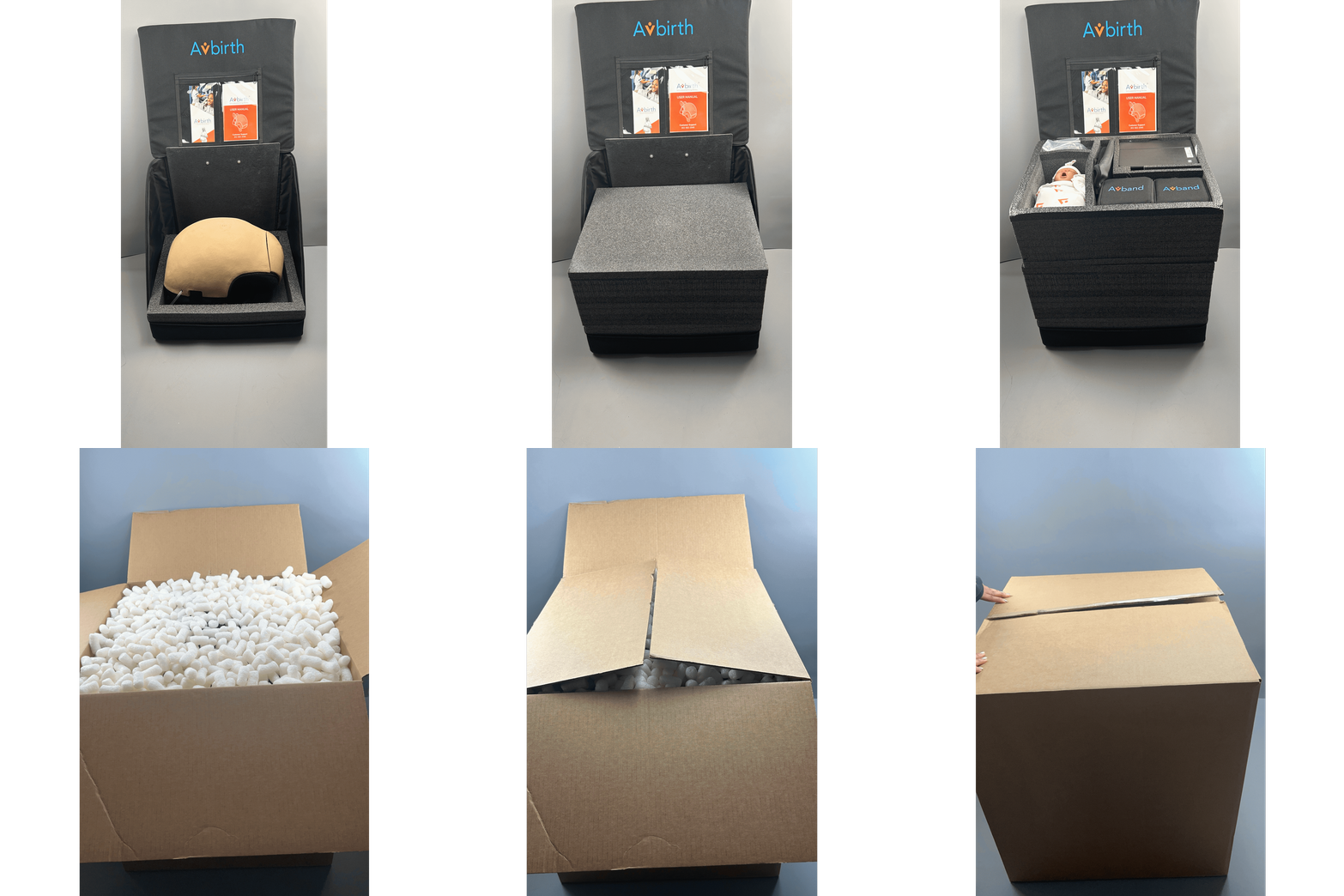
1. **Keep the wearable in its protective case**
Always return the device in the black protective case it was originally shipped in. This case is designed to protect your device during transit and prevents damage.
2. **Place the protective case in a cardboard box**
After securing the wearable in its protective case, place the case inside a sturdy cardboard box. You may use a new box or a recycled box in good condition.
3. **Add packing materials (if needed)**
If there is extra space in the box, add bubble wrap, packing peanuts, or crumpled paper to prevent movement during shipping. Avoid using loose materials that can shift too much.
4. **Seal and label the box**
Use strong packing tape to securely seal all seams of the box. If Avkin Support has asked you to include additional components, such as charging cords or accessories, place them inside the protective case with the device before sealing.
5. **Schedule your shipment**
Contact the carrier of your choice (UPS, FedEx, etc.) to schedule the pickup or drop-off. If you have a return shipping label provided by Avkin, attach it securely to the outside of the box.
The example below shows how an Avbirth device is secured inside its case before being placed in a shipping box.
- [Avkin](https://help.avkin.com/avkin?hsLang=en#main-content)
- [Avkin Consumables and Replacement Parts](https://help.avkin.com/avkin?hsLang=en#avkin-consumables-and-replacement-parts)
- [General Troubleshooting](https://help.avkin.com/avkin?hsLang=en#general-troubleshooting)
- [General Device Questions](https://help.avkin.com/avkin?hsLang=en#general-device-questions)
- [Avkin's Educational Programs](https://help.avkin.com/avkin?hsLang=en#avkins-educational-programs)
- [Avkin's Wearable Packages](https://help.avkin.com/avkin?hsLang=en#avkins-wearable-packages)
- [Shipping Devices for Maintenance](https://help.avkin.com/avkin?hsLang=en#shipping-devices-for-maintenance)
- [Avkin App](https://help.avkin.com/avkin-app?hsLang=en)
- [Avband](https://help.avkin.com/avband?hsLang=en)
- [Avbirth](https://help.avkin.com/avbirth?hsLang=en#main-content)
- [iSimulate CTGi Fetal Heart Monitor (FHM)](https://help.avkin.com/avbirth?hsLang=en#isimulate-ctgi-fetal-heart-monitor-fhm)
- [Avcath](https://help.avkin.com/avcath?hsLang=en)
- [Avstick](https://help.avkin.com/avstick?hsLang=en)
- [Avtone](https://help.avkin.com/avtone?hsLang=en)
- [Avthor](https://help.avkin.com/avthor?hsLang=en)
- [Avline](https://help.avkin.com/avline?hsLang=en)
- [Avtrach](https://help.avkin.com/avtrach?hsLang=en#main-content)
- [Avtrach with Ventilator (Simulated Lungs)](https://help.avkin.com/avtrach?hsLang=en#avtrach-with-ventilator-simulated-lungs)
- [Avtrach Video Series](https://help.avkin.com/avtrach?hsLang=en#avtrach-video-series)
- [Avwound](https://help.avkin.com/avwound?hsLang=en)
- [Tablets](https://help.avkin.com/tablets?hsLang=en)
- [Third-Party Devices](https://help.avkin.com/third-party-devices?hsLang=en#main-content)
- [iSimulate CTGi Fetal Heart Monitor (FHM)](https://help.avkin.com/third-party-devices?hsLang=en#isimulate-ctgi-fetal-heart-monitor-fhm)
- [Innov2learn Pulse Oximeter](https://help.avkin.com/third-party-devices?hsLang=en#innov2learn-pulse-oximeter)
- [Innov2learn Thermometer](https://help.avkin.com/third-party-devices?hsLang=en#innov2learn-thermometer)
- [KBPort BPSim](https://help.avkin.com/third-party-devices?hsLang=en#kbport-bpsim)
- [Standardized Patients (SP)](https://help.avkin.com/standardized-patients-sp?hsLang=en)
- [Service Agreements](https://help.avkin.com/service-agreements?hsLang=en)
[](https://avkin.com/)
avkin.com
Help Center
Copyright © 2025, Avkin